


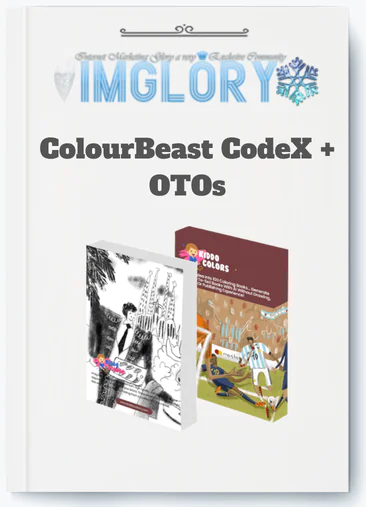
[Group buy] ColourBeast CodeX + OTOs
$10.00
ColourBeast CodeX is a training program and resource bundle that teaches how to create and sell AI-generated coloring books.
ColourBeast CodeX is an AI-powered training and resource bundle that teaches you how to create and sell coloring books with no drawing experience required. It was created by Azam Dzulfikar and published through WarriorPlus in 2025, at the convergence of AI-generated content and the rapidly rising printing industry.
The offering combines training videos, a tested prompt library, done-for-you (DFY) coloring packs, and step-by-step monetization instructions into a single purchase. It is aimed for newbies, Etsy sellers, KDP publishers, and side hustlers searching for a low-cost way into digital product income.
This guide covers exactly the following:
- A clear, no-fluff definition of ColourBeast CodeX and what it actually contains.
- A step-by-step breakdown of how the workflow operates in practice.
- A balanced look at the product's strengths and its real limitations.
- A side-by-side comparison with tools like Midjourney and Canva AI.
- A 10-to-14-day publishing roadmap for first-time buyers.
- Answers to the most common questions about licensing, pricing, and long-term value.
The product's philosophy is that a single idea, such as “Kawaii Pets,” may be expanded into 100+ sellable coloring book variants with the correct prompting structure and niche strategy. The timing is appropriate, given that AI-generated content and printed products are expected to grow rapidly by 2025. Continue reading to get the whole picture.
What Is ColourBeast CodeX in 2026?

ColourBeast CodeX is an AI-powered training system that comes with a useful resource bundle. Its goal is straightforward: to assist common people in creating print-ready coloring books using AI techniques, which they can subsequently sell on platforms such as Etsy, Amazon KDP, and Gumroad.
To be specific about what it is and isn't:
- What it is: A organized training program that includes prompt libraries, do-it-yourself coloring packs, and monetization tips.
- What it is not: A standalone AI picture generator, such as Midjourney, or a simple one-click template plug-in. You still direct; the system provides the blueprint and raw supplies.
Buyers of the bundle gain access to training videos and workshops, a library of over 100 pre-tested AI prompts, DFY coloring book packs across popular topics, and platform-specific help for Etsy, KDP, and Gumroad.
The “1 idea → 100 books” concept follows a branching strategy. You begin with a single subject, such as “Cute Kawaii Pets,” and then expand it across categories, including cats, dogs, unicorns, seasonal editions, holiday versions, and age-specific difficulty levels. Each branch generates its own product listing.
In terms of ecosystem positioning, ColourBeast CodeX is more akin to a business-in-a-box training course than a standalone AI art product. It assumes you will employ AI generation (with its offered prompts and recommended tools), but it concentrates primarily on the business aspect: how to select niches, put up listings, and drive repeat sales. This differentiation is significant when compared to anything else in the 2025 “AI coloring book” space.
Who Is ColourBeast CodeX Best For (and Not For)?
Before you spend money on any digital product, one question is critical: is this genuinely designed for someone like me? Here's a direct answer.
| ColourBeast CodeX Is Best For | ColourBeast CodeX Is Not Ideal For |
| Beginners starting a first side hustle with zero design experience | People expecting a fully automated, passive “push-button” income system |
| Etsy or KDP sellers who want to expand their digital product catalog | Those unwilling to spend time reviewing, tweaking, or uploading AI-generated content |
| AI-curious users who have no drawing or graphic design background | Users searching for a custom AI image engine with full generative control |
| Stay-at-home parents or part-time entrepreneurs with limited hours | Sellers wanting unique, hand-crafted or illustrator-quality book designs |
| Existing content creators who want a new monetizable product format | People who skip the training and expect results without implementation |
Consider two hypothetical buyers. The first is a stay-at-home parent working a few hours each week and launching a new Etsy shop. They have little design experience, are comfortable using a computer, and want a product that they can make, upload, and sell frequently. ColourBeast CodeX is perfectly suited to that profile.
The second customer is an experienced KDP publisher who already has over 30 listings and wants to add a coloring book vertical to their catalog without employing a designer. They understand the publishing process; all they need are the tools and cues to do the art side quickly. This item also fits them.
Where it falls short is when expectations are not aligned. Some purchasers come looking for a method that generates income without any continuous work. That's not what this is. You'll require basic IT skills to navigate a members area, download files, upload to a marketplace, and write product descriptions. You'll also need realistic time expectations: usually new users take one to two weeks from start to finish to list their first book.
ColourBeast CodeX excels in lowering the design skill barrier to near-zero levels. The learning curve consists of understanding the platform and the niche strategy, rather than learning how to draw or use technical tools.
How ColourBeast CodeX Works: Features, Workflow & Realistic Outcomes
ColourBeast CodeX has a well-defined workflow. Understanding each stage removes the mystery and establishes realistic expectations for how long things will take.
Here's the complete user path from purchase to published listing:
- Purchase and access: After buying through WarriorPlus, you receive login credentials to a members area where all resources are organized.
- Training phase: You work through video lessons and PDF guides covering niche selection, prompt usage, and platform setup.
- Prompt selection: You choose from the AI Prompt Library based on your chosen theme and intended audience.
- AI generation: Using the recommended AI tools (with the provided prompts), you generate the pages for your coloring book, typically 30 to 50 pages per volume.
- Download and review: You download the output in print-ready formats (PDF, PNG) and review for quality issues.
- Light editing (if needed): Minor fixes like removing AI artifacts or adjusting line weight are done using free web-based tools, no Photoshop required.
- Marketplace listing: You upload the finished book to Etsy, Amazon KDP, or Gumroad, write a product description using the provided guidance, and set your pricing.
Consider producing a “Zen Mandala for Stress Relief” coloring book. You access the prompt library, choose the Mandala/Zen category, select a prompt set designed for adult complexity and print contrast, generate 40 pages, download the files, check for stray artifacts, create a title cover with a free tool like Canva, and publish the full package to KDP in under two hours. That is a realistic schedule once you have completed the initial instruction; not on the first day, but by the second week.
It is important to distinguish between automated and manual processes in this context. The AI generates pages. You are responsible for everything else, including niche selection, quality review, cover design, creating your listing description, and managing your shop. The product teaches you all of this, but it does not do the work for you.
Core Modules & Resources Inside ColourBeast CodeX
ColourBeast CodeX is divided into four major resource categories. Each focuses on a separate stage of the creative and sales process.
- Training Library: Step-by-step video lectures and PDF guidelines for the entire workflow, from specialty research to publishing. Notable modules are “Niche Selection & Trend Research” and “Fast Etsy Listing Setup.”
- The AI Prompt Library has 100+ pre-tested prompts arranged by style and theme. The prompt categories include Kawaii, mandalas, animals, fantasy, and children's educational content.
- DFY Coloring Book Packs: Ready-to-sell page sets in popular themes, given in print-ready PDF and PNG formats.
- Monetization and Traffic Guides: Platform-specific advice for Etsy, Amazon KDP, and Gumroad, including listing optimization, price strategy, and basic traffic techniques.
All resources are given digitally through the members area, which can be accessed via a cloud-based login. No physical shipments or supplementary software subscriptions are required to access the core instruction.
AI Prompt Library: From One Idea to 100+ Coloring Books
Prompts are the foundation of any AI-generated content pipeline. A well-designed prompt affects whether your output resembles a commercial product or a rough experiment. This is precisely why the pre-tested prompt library included with ColourBeast CodeX is useful; it eliminates the trial-and-error phase that new AI users spend thousands of hours on.
The library is organized according to style and audience category:
| Prompt Category | Example Output Themes |
| Line Art / Illustration | Clean black-and-white pages optimized for print contrast |
| Kawaii | Cute characters, animals, food items with simple expressions |
| Mandala / Zen | Symmetrical adult patterns designed for stress-relief coloring |
| Animals | Wildlife, pets, farm animals, various complexity levels |
| Fantasy & Sci-Fi | Dragons, fairies, space creatures, mythological themes |
| Kids & Educational | Alphabet, numbers, simple nature scenes, early-learning themes |
The branching technique generates volume. Assume “Kawaii Cats” is the seed idea. That single notion expands outward: “Kawaii Space Cats,” “Kawaii Christmas Cats,” “Kawaii Yoga Cats,” and “Kawaii Halloween Cats.” Each variant is a different product listing with its own audience and seasonal search window. The prompts have been evaluated expressly for print-ready production and commercial appeal, which means the line weight, contrast, and page layout are designed for physical printing rather than screen viewing.
One-Click Generation & Customization: What You Actually Do on Screen
Here is what a typical working session looks like inside ColourBeast CodeX:
- To get to the Prompt Library, you need to be a member.
- If you want to do your own study, you can choose a niche or theme.
- Copy the suggested question and put it into the AI generator tool of your choice.
- Make a set of 30 to 50 pages and look over them all at once, not one at a time.
- After you download files in PDF or PNG format, do a quick quality check.
- Make small changes as needed: get rid of extra marks, change the color to improve print contrast, and make sure that the line weight is the same across all pages.
You can make changes to the design in a number of ways without using complex software:
- Using Canva's free plan, give the cover a title and your brand.
- Make themed packages by putting together pages from different DFY packs.
- Make a series by using the same style for all of the books in the series.
The difference between raw AI output and a polished, sellable book is lower than most people realize. Consider this: the AI drafts the pages, and you act as the editor, signing off before publication. There are no Photoshop abilities or illustration expertise required; only a trained eye for print quality, which is taught during the course.
Quality, Style & Niche Coverage of the Coloring Books
Many AI-generated coloring books fail financially due to print quality issues. Common issues include gray shading where white space should be, irregular line weight, and artifacts in fine-detail areas such as hands or faces. ColourBeast CodeX's prompt system is tailored to KDP printability criteria, thus outputs prioritize clear black lines, high contrast, and no fill sections that would leak on a printed page.
The style collection includes both in-demand and evergreen areas. On the one end, there are children's themes, simple animals, alphabet pages, and basic nature pictures with little line complexity and high audience volume. Adult-oriented mandala and zentangle designs, on the other hand, sell year-round on Etsy and KDP because they provide stress relief in addition to seasonal demand.
Popular categories with a track record of consistent sales across both platforms include:
- Cute animals and pets (cats, dogs, rabbits, evergreen demand)
- Mandalas and geometric patterns (adult stress-relief, consistent search volume)
- Fantasy themes (dragons, fairies, strong gift-purchase behavior)
- Holiday and seasonal editions (Halloween, Christmas, spike-driven but high-conversion)
- Professional and hobby themes (gardening, yoga, cooking, niche but loyal audiences)
Concerns about AI artifacts are addressed directly in the training. The prompt library is designed to avoid typical failure spots, notably those involving faces, hands, and symmetrical pattern integrity. The quality check stage in the workflow exists specifically to detect scenarios where generation does not satisfy the requirement.
Pricing Plans and OTOs detailed
Front-End – ColourBeast CodeX ($9.70 one-time)
- Access to a coloring book creation system with training and ready-made assets
- Includes full PLR rights to rebrand, sell, or bundle your creations
- Beginner-friendly setup for entering the coloring book niche quickly
- No subscriptions, hidden fees, or ongoing costs
- Includes bonus PLR opportunities and occasional marketing tool giveaways
- Low-cost entry point for testing a digital product side hustle
OTO 1 – Coloring Magic Prompts ($27 one-time)
- Advanced AI prompts for generating unlimited coloring page ideas
- Covers multiple themes and niches for scalable content creation
- Ideal for users who want more variety and creative control
OTO 2 – ColourEngine AI ($37 one-time)
- All-in-one AI engine for building complete coloring books
- Streamlines creation, formatting, and production process
- Best for users who want faster and more automated workflows
OTO 3 – BusyBook Genius Builder ($17 one-time)
- Tool for creating activity books on autopilot
- Expands beyond coloring into puzzle and activity niches
- Great for diversifying product offerings
OTO 4 – LaunchKit ($37 one-time)
- Done-for-you setup tools for launching products quickly
- Includes assets and guidance for faster go-to-market
- Ideal for beginners who want a shortcut to selling
OTO 5 – Coloring Goldmine ($7.95 one-time)
- Large starter library of ready-made coloring pages
- Quick way to build and launch products without creating from scratch
OTO 6 – Coloring Mega Collection ($27 one-time)
- Premium set of high-quality designs for rebranding and resale
- Designed for users who want more polished, sellable assets
OTO 7 – MegaColor Vault ($9.95 one-time)
- Massive vault of coloring assets for ongoing use
- Helps scale product creation with minimal effort
OTO 8 – CozyColor Paradise ($9.95 one-time)
- Collection of cozy, relaxing-themed coloring designs
- Targets trending niches focused on stress relief and mindfulness
OTO 9 – Inner Peace Art Book ($9.95 one-time)
- Mindfulness and relaxation-focused coloring packs
- Ideal for audiences interested in wellness and self-care
OTO 10 – BrainBoost Activity Vault ($17 one-time)
- Kids-focused activity pack with brain-training exercises
- Targets educational and puzzle-based niches
Pros, Cons & Honest Verdict on ColourBeast CodeX
Every product has trade-offs. The table below lays them out without softening either side.
| Pros | Cons |
| Beginner-accessible, no prior design or AI experience required | Funnel upsells (OTOs) can feel overwhelming at checkout |
| Fast production timeline, first book possible within one to two weeks | AI output requires manual review; not every page is print-ready |
| Covers a wide range of niches with both DFY packs and prompt options | Marketplace competition on Etsy and KDP is real and growing |
| Monetization guidance is built into the product, not sold separately | Buyers still need to learn basic listing and SEO practices |
| Lifetime access to materials (as of current offering) | No built-in AI generation engine, external tools are required |
| Low one-time cost compared to hiring a freelance illustrator | Results depend heavily on consistent implementation |
| Platform-flexible: Etsy, KDP, Gumroad all covered | Style range is focused on coloring books, not broader printable products |
Top 10 Advantages of Using ColourBeast CodeX in 2025
- Rapid content production compared to hand-drawing or hiring illustrators.
A professional illustrator charges $15 to $50 USD each page. At that rate, a 40-page coloring book costs between $600 and $2,000 before you make a penny. ColourBeast CodeX fully transforms that math; you build pages in batches using AI prompts, reducing production time from weeks to days.
- No design software or drawing skills required.
The entire workflow relies on AI generating tools and free web-based editors. If you can navigate a browser and copy-paste a prompt, you have the technological foundation to get started.
- Access to prompts that have been tested for commercial output.
Building a workable prompt library from start takes time; most people iterate for weeks before producing print-ready output. The pre-tested library avoids this step entirely, resulting in outputs tuned for KDP contrast standards and Etsy buyer expectations.
- Monetization training is built into the product.
Most AI art programs show you how to create graphics. They don't show you how to price, list, or sell them. ColourBeast CodeX includes the business layer, specialty selection, listing copy, price strategy, and creative tools.
- Reusable templates and prompts work across multiple niches.
Once you understand how a prompt category works, you can use the same framework for any theme variant. A prompt architecture designed for “Kawaii Animals” easily converts to “Kawaii Holidays” or “Kawaii Professions” without having to start from scratch.
- Lifetime access to the core training and resource library.
When you buy ColourBeast CodeX, you get access to the materials forever, without having to pay monthly fees like with subscription-based tools. You can go back to the lessons whenever you want.
- Low entry cost relative to the alternative.
Freelance illustration, design software licenses, and course bundles that teach the same things would cost a lot more than ColorBeast CodeX. For someone who has never sold a digital product before, that price difference is what makes them start or not start.
- Scalable once the initial workflow is understood.
Learning the system, picking a niche, and going through the process for the first book take the most time. After that, output speeds up. Once the process is mastered, many sellers print five to ten books at a time.
- Works across multiple selling platforms without platform lock-in.
Etsy lists the coloring book as a digital download, KDP lists it as a print-on-demand item, and Gumroad lists it as a straight sale. There is more than one way you are building your business.
- Supports recurring income through series, bundles, and seasonal editions.
A coloring book series titled “Volume 1, Volume 2, Volume 3” with a constant subject encourages repeat purchases. Seasonal editions (Christmas, Halloween, and Valentine's Day) generate annual sales cycles that grow over time.
Seven Potential Drawbacks & How to Mitigate Them
- Issue: AI output quality is inconsistent across generation sessions.
Not all batches of AI-generated pages meet print-ready requirements. Artifacts, asymmetry in mandala patterns, and distorted fine detail emerge unexpectedly. Mitigation: Create a simple quality checklist that includes line consistency, contrast level, the absence of gray fill, and page margin compliance, and then review each page before downloading.
- Issue: Marketplace competition on Etsy and KDP is significant.
The “AI coloring book” category is visible to thousands of sellers. Launching a generic “mandalas coloring book” into a saturated category without distinction generates minimal interest. Mitigation: Use long-tail niche themes; for example, “Kawaii Space Cats for Teens” has a higher discoverability than “Cute Cat Coloring Book”. The training's niche selection module handles this directly.
- Issue: The WarriorPlus checkout funnel includes multiple upsell offers (OTOs).
New purchasers frequently feel pressured at checkout when presented with three to five upgrade options immediately after purchase. Mitigation: Consider the front-end offer as a starting point. Examine each OTO's description carefully and only include what is relevant to your present aim. You don't need every upgrade to make your first sale.
- Issue: Setting up external AI tools and accounts adds friction for total beginners.
ColorBeast CodeX doesn't come with its own AI writing engine. To make pages, you will need accounts on outside sites. To fix the problem, follow the step-by-step starting plan in the training. It shows you the exact order in which to set up the tools. For new users, most accounts are free or very cheap.
- Issue: KDP and Etsy have platform-specific content policies.
Some platforms don't have clear rules about AI-generated material, and those rules change over time. If the rules change, a book that gets good reviews now might have trouble in the future. Fix: Before publishing, read the current content rules on both platforms. Copyrighted characters or styles should not be used as inspiration for your own work.
- Issue: Producing a meaningful catalog takes time, especially while working another job.
One or two books rarely produce steady revenue. Creating a collection of 20 to 30 listings normally requires two to three months of regular labor. Mitigation: Combine your creation sessions. Instead of working in little chunks of time, set aside one or two days every week to generate and upload books.
- Issue: The “shiny object” pattern, buying but not implementing.
Digital product tools entice shoppers who jump from product to product without completing any of them. ColourBeast CodeX, like any training, yields results only when applied. Mitigation: Set a three- to four-week implementation window before reviewing results. Establish a concrete goal: publish five books within 30 days of purchase.
ColourBeast CodeX vs Alternatives: Which Tool Should You Use?
Understanding where ColourBeast CodeX sits in comparison to other products allows you to make a decision based on your actual scenario rather than marketing rhetoric. The following comparison includes the tools that are most usually regarded alongside it in 2025.
| Tool | Ease of Use | Cost Structure | Output Type | Learning Curve | Monetization Support | Best For |
| ColourBeast CodeX | High (guided workflow) | One-time purchase | Coloring books (PDF/PNG) | Low-to-medium | Built-in (Etsy/KDP/Gumroad) | Beginners wanting a coloring book business |
| Midjourney | Medium | Monthly subscription | General AI images | Medium-to-high | None, you handle selling | Artists, designers, AI art creators |
| Canva AI (Magic Media) | Very high | Free tier + Pro | General graphics and images | Low | None, Canva is a design tool | General graphic design, social media |
| BookBolt | High | Monthly subscription | KDP book research + templates | Low-to-medium | Partial (KDP-focused research) | Existing KDP publishers doing niche research |
| Generic PLR Coloring Books | Very high | Per-pack purchase | Pre-made coloring pages | Very low | None, you resell as-is | Quick catalog expansion, no customization |
The table reveals a common pattern: most alternatives provide generation capabilities without monetization direction (Midjourney, Canva), research tools without content production (BookBolt), or pre-made material without business understanding (PLR bundles). ColourBeast CodeX is the solution that combines all three levels, creation, training, and sales, into a single offering.
The trade-off is specificity. If your goal is more than just coloring books, such as creating illustrated children's stories, printable calendars, or social media graphics, the other tools are more versatile. ColourBeast CodeX is designed specifically for one output format. Within that format, it delves deep.
When to Choose ColourBeast CodeX Over Midjourney or Canva
The decision between ColourBeast CodeX and a general AI picture tool boils down to three questions. What would you like to make? How much do you know already? And what is your goal: art production or wealth generation?
Select ColourBeast CodeX when:
- You don't just want a tool; you want a business. The teaching goes over the whole process, from making the product to selling it. Midjourney makes pictures, but it doesn't tell you how to list your products or set the price of a coloring book package.
- You have never designed anything before. There is a real learning curve for Midjourney's prompt innovation. It takes weeks of practice to make print-ready coloring book pages that are always the same, don't have any glitches, and understand aspect ratios, line weight settings, and negative prompts. ColorBeast CodeX fixes that part ahead of time.
- It's better to use tried-and-true prompts than to start from scratch. It takes a different set of skills to make a prompt library that consistently produces line art that can be printed through KDP, not just pictures that look good. Prompts that have already been tried skip all of that learning cost.
To put it simply, making a single 50-page coloring book from scratch with Midjourney, including prompt creation, iteration, page selection, and print reformatting, normally takes 8 to 15 hours for a user with no prior experience. Using the ColourBeast CodeX prompt library and methodology, a comparable book takes two to four hours to complete by week two.
Choose Midjourney or Canva if you need image development for something other than coloring books, branding, social content, or product mockups, or if you want complete creative control over a variety of visual styles without a certain niche direction.
Step-by-Step: From Purchase to Publishing Your First Book in 10–14 Days
The quickest way to fail with a digital product training course is to watch all of the videos before getting started. The quickest path to success is to execute while learning. The roadmap below is structured in exactly that manner.
| Day Range | Task | Goal |
| Day 1–2 | Watch the overview training, complete the niche selection module | Choose one niche; write down three theme variations |
| Day 3–4 | Open the prompt library, generate your first 30-to-40 pages | Produce a raw page set in your chosen theme |
| Day 5–6 | Review pages for print quality, run light edits on any problem pages | Have a clean, print-ready page set |
| Day 7–8 | Create a cover using Canva's free templates, add title and subtitle | Complete the full book file |
| Day 9–10 | Set up your Etsy or KDP account (if not already done), write your product description | Have a live or draft listing ready |
| Day 11–14 | Optimize listing keywords, set pricing, launch, and monitor initial traffic | First published book live on marketplace |
Some quick-start principles that are more important than the schedule:
Begin with one niche and platform. The need to address ten niches across three markets at once slows things down and dilutes focus. Choose one theme with a proven search volume on Etsy or KDP, and publish one whole book before expanding.
Your first book will take longer than the second. That is expected and normal. After running the workflow from beginning to end, it becomes faster. Do not base your future productivity on the timeline from the first book.
Take the listing description as part of the product. A coloring book with a clear title, targeted keywords, and a benefit-focused description sells more than a comparable book with a generic title. The monetization training in ColourBeast CodeX covers this; do not skip it for the sake of speed.
Supplemental Q&A: Key Questions About ColourBeast CodeX
Is ColourBeast CodeX a One-Time Purchase or a Subscription?
As of 2025, the front-end ColourBeast CodeX offer is a one-time purchase rather than a monthly subscription. You pay once and get unlimited access to the core training, prompt library, and DFY packs without a monthly subscription.
There are optional upgrades (OTOs) available at checkout. Some of them are one-time purchases, while others may involve recurring components for specific tools or resource levels. Before purchasing extra tiers, review each OTO explanation at checkout.
What Exactly Do “DFY Coloring Book Packs” Include?
Done-for-you (DFY) packs are pre-made, ready-to-sell page collections that you can publish without having to create any AI content yourself. Each pack normally contains:
- 20 to 40 print-ready coloring pages on a specific theme.
- Files delivered in PDF and high-resolution PNG formats (typically 300 DPI for print compliance).
- Pages formatted to standard print dimensions (letter size or A4, depending on the target platform).
The primary distinction between DFY packs and AI-generated from scratch pages is customisation. DFY packs are fixed collections; you can use them as is or combine pages from various packs to create a themed bundle. In comparison, prompt-generated books allow you to have greater influence over the style and theme specificity.
What Types of Coloring Books Can You Create with ColourBeast CodeX?
The system covers a broad range of formats, grouped here by three organizing principles:
By age group:
- Kids (ages 4–10): Simple line art, large shapes, recognizable characters and animals.
- Teens (ages 11–17): Moderate detail, anime-influenced styles, hobby and interest themes.
- Adults (18+): Intricate mandalas, detailed fantasy scenes, mindfulness and wellness themes.
By theme:
- Animals and pets, mandalas and zentangle patterns, fantasy and mythology, holiday and seasonal editions, educational content (alphabet, numbers, nature).
By difficulty level:
- Entry-level (low detail, wide lines, few fill areas) versus advanced-level (high detail, fine lines, complex fill patterns).
How Does ColourBeast CodeX Compare to Buying Generic PLR Coloring Books?
| Factor | ColourBeast CodeX | Generic PLR Packs |
| Uniqueness | Higher, AI-generated or customized per your niche | Lower, same files sold to hundreds of buyers |
| Customization | Full, you direct themes, styles, variations | None, fixed content, no modification |
| Scalability | High, prompt system generates unlimited variations | Limited, you are buying fixed inventory |
| Branding control | Strong, you add your own cover and identity | Weak, many sellers use identical pages |
| Learning curve | Medium, requires workflow understanding | Very low, download and upload |
PLR bundles provide the quickest path to the #1 listing. ColourBeast CodeX has the superior long-term position. When lots of dealers list the same PLR pages, distinction is lost totally. A prompt-generated catalog based on a certain specialty angle maintains a more defensible position with time.
Do You Need Prior AI or Design Experience to Use ColourBeast CodeX?
No. The product is designed exclusively for consumers without either background. What you really need is basic digital literacy, which includes the ability to use a browser, create online accounts, download files, and publish stuff to a marketplace. If you can shop online and use Google Docs, you have the fundamentals.
A few more details:
- You don't need to know how AI models work; all you need to know is how to use the tool's prompts.
- You don't need to know anything about graphic design to use the DFY packs. The free version of Canva lets you make light changes.
- The training starts from scratch and assumes that the person has no previous knowledge.
Can You Legally Sell the Books You Create With ColourBeast CodeX?
Yes, with conditions. ColourBeast CodeX includes commercial rights, which allow you to sell coloring books and DFY packs generated with the offered prompts on third-party markets such as Etsy, Amazon KDP, and Gumroad.
Key conditions to be aware of:
- The commercial license typically covers selling final compiled books, not reselling the raw prompts or source files as standalone products.
- Content generated using external AI tools (like Midjourney or other generators) is subject to those platforms' own terms of service, review them before publishing.
- Avoid generating content that closely imitates copyrighted characters, brand identities, or trademarked visual styles, regardless of the ColourBeast CodeX license.
In some cases, yes. You can use the business rights that come with ColourBeast CodeX to sell coloring books you make with the prompts and do-it-yourself packs on Etsy, Amazon KDP, and Gumroad, among other places.
What Happens If ColourBeast CodeX Stops Being Updated?
This is a legitimate question for any digital training product, and the honest response is that the essential value remains unchanged even without future improvements. Here's why.
The instructional concepts and prompt framework are the most durable components of the offering. Niche research methodology, listing optimization reasoning, and the branching strategy for developing one idea into numerous volumes are talents that may be applied across platforms and throughout time. These do not expire once a product stops receiving new module additions.
What might become old:
- Platform-specific interface walkthroughs (Etsy and KDP update their dashboards periodically).
- AI tool recommendations, since the generative AI landscape evolves at speed.
- Trend-based niche suggestions, which shift with consumer behavior.
What remains evergreen:
- The quick engineering framework for making line art that is ready to print.
- How to build a catalog of coloring books based on a business plan.
- The basics of making money from digital products that can be used in any market.
The practical mitigation is straightforward: use the training to develop the skill rather than just following the steps. A buyer who knows why a prompt structure works, rather than just which prompt to replicate, will adjust as tools evolve. That is the distinction between using ColourBeast CodeX as a shortcut versus as a basis.
Be the first to review “ColourBeast CodeX + OTOs”
You must be logged in to post a review.
Related products
GB Courses
Original price was: $399.00.$32.00Current price is: $32.00.
Original price was: $997.00.$49.95Current price is: $49.95.
Original price was: $97.00.$19.00Current price is: $19.00.
GB Courses
Original price was: $499.00.$39.95Current price is: $39.95.

Original price was: $600.00.$67.00Current price is: $67.00.
Reviews
There are no reviews yet.