

INSTANT
[Group buy] HumanPal 2.0
Price range: $2.00 through $97.00
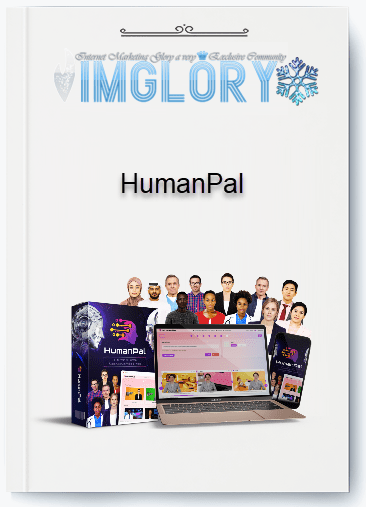
HumanPal is The #1 All-Inclusive Solution To Create AI Human Spokesperson Videos In Mere Minutes…
What is HumanPal 2.0?

HumanPal 2.0 is a comprehensive upgrade of the previously popular AI avatar video creation tool. In essence, this is a platform that helps users turn text into videos with virtual speakers, with the ability to perfectly synchronize mouth shape and voice.
The highlight of HumanPal 2.0 lies in the ability to “breathe life” into characters. Avatars not only know how to read lines, but also have diverse expressions: from smiles, frowns, to sighs or giggles. All are simulated naturally, making viewers feel like they are chatting directly with a real person.
Compared to previous tools that were quite “robotic” and rigid, HumanPal 2.0 brings a different experience. The smoothness in every movement, eye contact and tone of voice makes the video more intimate, easier to touch the viewer's emotions. And it is this factor that has turned HumanPal 2.0 into one of the most notable tools in the field of AI video today.
Outstanding features of HumanPal 2.0
Rich template library – Unlimited creativity
One of the things that impresses users when experiencing HumanPal 2.0 for the first time is the huge template library. Not only stopping at basic frames, HumanPal also offers a series of unique presentation models: from poster frames, laptop screens, picture frames in galleries, to creative video mockups.
You can easily put your spokesperson into a professional presentation, or create a product promotion by inserting brand images into the video background. In particular, the system also supports vertical videos – optimized for TikTok, Instagram Reels or YouTube Shorts – something that modern marketers will definitely need.
New generation Avatar – Natural expressions, flexible movements

If the first version of HumanPal still revealed “fake camera angles”, 2.0 has completely overcome them. The avatars are designed to be more realistic, with lip movements that match perfectly with the voice. In particular, the system also allows you to customize the “exaggeration” of the mouth shape: strong, medium or light – suitable for each shooting angle and video style.
For example, in a full-body shot, the avatar can speak with clearer lip movements, while a close-up shot will require subtlety and moderation. This is a small but extremely important detail, creating a natural feeling for the viewer.
Emotional AI Voice – When AI knows how to laugh, sigh and “act”

A breakthrough of HumanPal 2.0 is the feature of inserting emotions into the reading voice. Users can add “tags” like laugh, sigh, chuckle right in the script. As a result, the avatar will express that exact emotion in the video.
Imagine you write a product introduction script with the sentence “This is the best gift I have ever received” and insert the tag [laugh]. Immediately, the virtual character will smile brightly when saying that sentence. This not only makes the video more lively, but also increases the emotional connection with the viewer.
Face Swap – Become the main character in the video
Another extremely interesting feature is Face Swap. You can completely put your own face or any image into the avatar, so that the character can “speak” in the video. This opens up a series of new applications: from creating personalized videos for customers, to online lectures, where teachers can “appear” without turning on the real camera.
Multilingual support and automatic subtitles
In an increasingly connected world, language barriers are always a big challenge. HumanPal 2.0 solves this with voice synchronization in many different languages, with natural pronunciation quality. It comes with automatic subtitles, which can be customized in color to match the brand. This makes videos easily reach a global audience without the need for additional translation software or complex editing.
Integrate media, background music and customize footage
HumanPal 2.0 allows users to insert images, videos or brand logos directly into the mockup. You can easily create a product promotion clip, in which the avatar introduces and shows the product right next to it.
In addition, the built-in background music library also makes the video more professional. The system also automatically reduces the music volume when the character speaks, providing a harmonious audio-visual experience.
Extremely fast rendering speed – Create videos in just a few minutes
Instead of waiting for hours like traditional video editing software, HumanPal 2.0 uses high-speed rendering technology. Just a few minutes after clicking “Create”, you will have a complete video. This is a great advantage for those who do marketing or content creation and need to produce a large number of videos in a short time.
How does HumanPal 2.0 work?
With just a few clicks, you can turn a dry script into a vivid video with an AI character that can walk, talk, even smile and express emotions. Let's go through 5 simple steps to see how HumanPal 2.0 works:
Step 1: Choose a template and scene
HumanPal 2.0 provides a rich library of templates – from video mockup (placing the avatar on a computer screen, phone, poster, etc.), to full-body spokesperson (a full-body character walking in a scene like a studio, museum, office).
The interesting thing is that each template has additional “variations”: typewriter-style slideshow, isometric, green screen for you to combine scenes as you like. This way, you can easily choose the right style for your purpose – product promotion, internal training, or eye-catching social media videos.
Step 2: Choose an AI character and voice
Next, you will choose from 60+ new generation virtual avatars – some standing, some walking, some gesturing naturally. Do you want a young female MC, a tech expert or a mature businessman? They are all available.
At the same time, HumanPal 2.0 automatically suggests suitable voices (male/female, multiple languages, multiple emotions). You can try listening to each voice first to choose the right tone. Not just stopping at “reading”, AI voices can also laugh, sigh, chuckle…, bringing a more “real” feeling than ever.
Step 3: Enter the script and add emotions
You just need to paste the script (pre-written or AI-generated). The strength of HumanPal 2.0 is the ability to tag emotions right in the dialogue: add the symbol “laugh” to make the character laugh, or “sigh” to make them sigh. This turns your video from a “straight” speech into a performance with rhythm and emotion, helping viewers easily get caught up in the story.
Step 4: Customize content & effects
Before exporting the video, you can customize a series of elements: add images, videos, logos, text, insert background music from the library or upload your own music. The scripts are automatically divided into many scenes, you can drag-and-drop to arrange, edit each scene, add professional intro or outro.
In addition, HumanPal 2.0 also supports automatic subtitle generation and translation into multiple languages, which is very useful if you want to expand to the international market.
Step 5: Export videos at high speed
Once everything is in place, just name the project, choose the resolution (1080p), and hit the create button. HumanPal 2.0 has an extremely fast rendering engine, and it only takes a few minutes to have a finished product. Videos can be downloaded, edited, or cloned for reuse in different scenarios.
Where to buy cheap HumanPal 2.0 accounts?
If you have learned about HumanPal 2.0 – the ultimate AI avatar video creation tool, you must be wondering: “How to buy a licensed HumanPal 2.0 account at the cheapest price while still ensuring quality and reputation?”
We completely understand this, because not everyone can afford to spend a high cost on an international software, especially when the original price of HumanPal 2.0 can make many people hesitate. Therefore, IMGlory was born to help you have the opportunity to experience genuine copyright at a much more economical cost.

What's special about the HumanPal 2.0 Full Pay account at IMGlory?
Currently, our shop IMGlory is offering the HumanPal 2.0 Full Pay package – this is the most complete version with a “reasonable” price, shared but still ensuring all premium features.
Upgrading this package will give you:
- ✅ Everything In Commercial Plan – all basic and commercial features.
- ✅ 5 minutes of video length (suitable for most advertising, product introduction, teaching needs).
- ✅ 40+ Premium Walking AI Presenters – over 40 AI characters that walk and gesture naturally.
- ✅ 200+ premium emotional AI voices – from fun, serious, professional to humorous.
- ✅ Face Swap – replace your face on the AI avatar, turning you into a unique “virtual presenter”.
- ✅ AI Custom Avatar Face Generator – create a new AI character based on your face photo face.
- ✅ 45+ Premium Video Templates – professional video template library, just choose and customize.
- ✅ Free copyright music, video, image library – no worries about copyright on YouTube, Facebook.
- ✅ Fastest rendering speed – create videos in just a few minutes.
- ✅ Interactive Video Player App – interactive video player, helps increase conversion rate.
- ✅ No monthly fee, unlimited video rendering.
👉 In other words, this is the full version that if you buy directly from the official website, the cost will be many times higher. But at IMGlory, we share the common package so the price is extremely affordable.
Why should you choose to upgrade your HumanPal 2.0 Full Pay account at IMGlory?
There are many reasons why customers choose us instead of buying directly or finding less reputable places:
- Low price – maximum cost savings
- If you buy separately, the HumanPal 2.0 license can cost several hundred dollars.
- But when using it together through IMGlory, you only need to spend a small amount and still have all the features.
- Reputable, highly appreciated by many customers
- We have served thousands of brothers who are passionate about AI tools and international software.
- Continuous positive feedback, proving our reputation and quality.
- Full features like the original
- No important function limitations.
- Full avatars, voices, templates, and even face swaps.
- No hidden fees, no monthly renewals
- You only pay once, no need to worry about “consuming” periodic maintenance costs.
- Wholehearted support
- IMGlory team is always ready to support you when you encounter difficulties during use.
Who is HumanPal 2.0 suitable for?
In fact, HumanPal 2.0 is not only for marketers, but anyone who wants to make professional videos quickly can take advantage of it:
- Small businesses / startups: Advertise products, introduce services without hiring expensive MCs or studios.
- Teachers, online lecturers: Create vivid lectures with virtual characters, easily attract students.
- YouTuber, TikToker, content creator: Turn ideas into attractive videos in just a few minutes, without worrying about music/image copyright.
- Freelancer, marketing agency: Accept video making projects for customers, increase income without spending time on filming and editing.
- Beginners: No editing skills required, just a few clicks Click to have a beautiful professional video.
👉 In short: if you want to make a video quickly – beautifully – cheaply, HumanPal 2.0 is an option not to be missed.
Instructions for buying a HumanPal 2.0 account at IMGlory
To make it easier for you to visualize, here are step-by-step instructions:
- Access the IMGlory website
- You can search directly on Google or click on the official shop link.
- Choose the HumanPal 2.0 Full Pay package
- Read the description carefully, see the features to make sure it meets your needs.
- Payment
- We support many methods: Momo, bank, e-wallet… convenient and fast.
- Receive account via email/zalo
- After payment payment, you will receive login information with detailed instructions.
- Start the experience
- Log in, choose a template, import a script, and start creating your first video.
Some frequently asked questions
❓ Can I create unlimited videos?
👉 Yes! You can render unlimited videos at fast speed.
❓ Can I face swap (put my face on the avatar)?
👉 Yes. This is one of the most unique features of HumanPal 2.0 Full Pay.
❓ Is it safe to buy at IMGlory?
👉 Absolutely safe. We provide genuine accounts, trusted by thousands of customers.
❓ What if I encounter an error while using it?
👉 The support team is always ready to help you handle it quickly via Zalo, Email or Fanpage.
Conclusion
With what we have just shared, you must have clearly seen the great value that HumanPal 2.0 brings: from saving video production costs, to the ability to create professional content in just a few minutes.
More importantly, when purchasing at IMGlory, you will own the Full Pay version – full of features, extremely cheap price, no hidden fees, no limits. This is the smart choice for anyone who wants to catch up with the booming AI video trend.
👉 So, don't hesitate any longer. Visit IMGlory to upgrade your experience with HumanPal 2.0 today. Trust us, you won't regret it!
| Time | 1 Month, 1 Year, 3 Months, 6 Months, Lifetime, Trial |
|---|
Related products
GB SAAS Tools
Original price was: $800.00.$40.00Current price is: $40.00.
GB SAAS Tools
Original price was: $290.00.$31.50Current price is: $31.50.
GB SAAS Tools
Original price was: $116.00.$12.00Current price is: $12.00.

Out of stock
GB SAAS Tools
Original price was: $804.00.$55.00Current price is: $55.00.
GB SAAS Tools
Original price was: $350.00.$75.00Current price is: $75.00.