
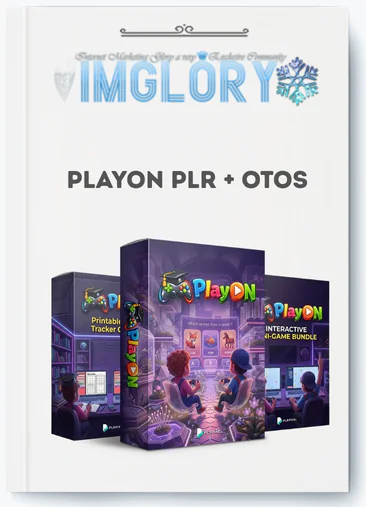
[Group buy] PlayON PLR + OTOs
$14.00
PlayON PLR is a bundle of ready-made kids’ educational digital products with full resale rights for rebranding and selling.
This article is intended for those who sell digital products on Etsy, Teachers Pay Teachers (TPT), Shopify, or Gumroad, as well as those who manage a homeschool blog, coaching program, or educational content channel.
PlayON PLR is a no-code kids' interactive educational game bundle with full Private Label Rights (PLR), allowing you to alter, rename, and resell each element as your own product. In 2026, parents and homeschool makers are actively looking for interactive learning games in digital markets. Static worksheets do longer convert as they used to. Buyers want something that feels like an app, and PlayON PLR was designed to fit that need.
This tutorial covers everything: what PlayON PLR is, what's included in the bundle, how PLR rights operate, who the product is best suited for, how to personalize it without writing a single line of code, where to sell it, and straight answers to the most common customer queries.
What Is PlayON PLR?

PlayON PLR is a ready-made digital product bundle that includes kids' interactive educational games, Canva design templates, HTML5 micro-games, and printable generators. It comes with full Private Label Rights, allowing buyers to change, rebrand, and resell the content as their own.
Consider it a pre-built product line for the children's education niche. You do not require development or design experience. You take the files, add your branding, and list the finished product under your own shop or brand name. A vendor may launch a product named “Kindergarten Brain Games Pack” in less than 30 minutes, using only PlayON PLR assets.
Inside the PlayON PLR Bundle: Components and Formats
Canva Game Templates (8+ Ready, to, Edit Designs)
The Canva templates provide the backbone of the bundle. They include memory match games, vocabulary quizzes, image puzzles, reward charts, and flashcard sets, all of which are intended for early learners aged 3 to 10.
Each template is compatible with the free version of Canva. You access the URL, copy it to your Canva account, and then use a drag-and-drop interface to alter the colors, fonts, text, and images. There's no need for design software.
HTML5 Interactive Mini, Games and Challenge Tools
The HTML5 layer distinguishes PlayON PLR from a regular printed bundle. These include browser-based mini-games, reward spinners, challenge wheels, randomizer tools, score trackers, and question prompts.
The files are given in compressed HTML bundles. You can test the game in any online browser before deploying it on a website, embedding it within an LMS (Learning Management System), or packaging it as an offline downloaded game. They are compatible with both mobile and desktop devices and require no additional plugins.
For sellers, this means you can provide something that most Etsy or TPT competitors cannot: a product that functions as a lightweight online app rather than a PDF download.
Printable Worksheet and Certificate Generators
The generator templates serve as foundational designs. You customize the content fields, skill level, topic, and student name placeholders before exporting as PDF. The procedure generates an unlimited number of worksheet and certificate variations from a single template source.
This makes it possible to provide tiered product packs, easy, medium, and hard difficulty sets, or grade-segmented versions (pre-K through Grade 3). Sellers can combine numerous PDFs into a single zip file and offer them as classroom resource packs or instant download products.
Multi, Language and Localization Features
All text in the Canva templates is on editable text layers. To change visible strings in HTML5 files, simply use a basic config file or inline text field; no code is required.
This makes localisation simple. Duplicate the base template, replace the text with your target language, such as Spanish (ES), French (FR), German (DE), or Vietnamese (VI), adjust the fonts if the language requires expanded character support, and save the file with a language-suffix name convention. One base product can create three or four language versions, each of which is listed separately.
File Types, Delivery, and Tech Requirements
A basic PlayON PLR delivery consists of Canva template share links, compressed HTML5 game files, exported PDF samples, and a documentation folder. Here's a quick overview of what each output format supports in 2026:
| Output Format | How It's Delivered | Where It Can Be Sold |
| Canva, Edited PDF | Export from Canva as PDF | Etsy, TPT, Gumroad, own site |
| HTML5 Game (zip) | Zipped folder with HTML/CSS/JS | Own website, LMS, Gumroad |
| Printable Pack (PDF) | Multiple PDFs bundled in zip | Etsy, TPT, Shopify, own site |
| Web Embed (iframe) | Embed code from HTML file | Membership site, course platform |
A web browser, a free Canva account, and tools to unzip files are all you need for tech. To get started, you don't need any APIs, code, or hosting plans.
Pricing plans and OTOs detailed
Front End: PlayOn Bundle – $14
- Access interactive Canva-based educational games and editable learning templates
- Create HTML mini-games and printable worksheets for kids’ activities
- Includes certificate generator and tools for building learning materials
- Full PLR rights to rebrand, customize, and sell your own products
- Beginner-friendly system to launch kids’ educational products quickly
OTO 1: PlayOn PRO – $19–$25
- Unlock 10 additional interactive Canva games for expanded learning topics
- Access 5 HTML mini-games to improve engagement and interactivity
- Includes 6 printable worksheet and tracker generator tools
- Fully editable assets with PLR rights for resale and branding
- Bonus extra mini-game included for added product variety
OTO 2: PlayOn Interactive Kids Productivity Micro Apps – $17
- Get 7 HTML-based productivity and habit-building micro apps for kids
- Includes tools like goal trackers, streak builders, and reward systems
- Encourages engagement through gamified learning and daily challenges
- No coding or installation required for instant deployment
- Full PLR rights to rebrand and sell as your own products
OTO 3: SmartKids Bundle – $32
- Access a large library of editable kids’ games and quizzes
- Includes 100+ animated science videos covering educational topics
- Create learning bundles, courses, or membership content بسهولة
- Fully customizable assets with complete PLR rights included
- Ideal for building a large-scale kids’ educational product catalog
OTO 4: Genius Kids Bundle – $29
- Unlock dozens of interactive learning games and quizzes for kids
- Includes a massive asset library with 36+ categories for game creation
- Access ready-made voiceovers and game script ideas
- Create and customize unlimited educational content quickly
- PLR rights included to rebrand and sell all materials
OTO 5: PLR Pixel Mega Bundle – $47
- Get access to multiple PLR Pixel products and their PRO versions
- Includes games, videos, planners, and kids’ content creation tools
- Build a complete kids’ education brand with diverse digital assets
- Rebrand, customize, and sell everything with full PLR rights
- Massive content library to scale faster and increase income potential
Who Is PlayON PLR Best For in 2026?
Digital Product Sellers (Etsy, Shopify, Gumroad, TPT)
If you already offer digital downloads on Etsy or TPT, PlayON PLR will help you quickly transition to a higher, perceived value product category. Most competitors in the children's education area offer flat PDFs.
Adding an HTML5 interactive game to a listing, or offering a “printable + digital game” combo, distinguishes a product on the search results page. This difference will be important for Etsy vendors in 2026, as the market becomes saturated with conventional AI-generated printables.
Teachers, Tutors, and Homeschool Creators
A school teacher who earns a side income selling materials can use PlayON PLR to create games that correspond to certain curricular topics. The templates easily convert to Montessori-style activities, Sunday school games, and multilingual learning packages.
Homeschool bloggers and tutors frequently create content for specific groups such as unschoolers, classical education families, and language immersion households. The localization option in PlayON PLR allows you to serve unique consumers with dedicated language, variation items.
Content Creators, Coaches, and Course Builders
Coaches offering parenting or homeschool programs can use PlayON PLR assets as course bonuses, engagement elements within a membership area, or free lead magnets to build their email list. A “free kids' math game pack” opt-in is a tangible, high-converting lead magnet in the parenting area.
Course makers creating children's learning programs can quickly incorporate interactive components without hiring a developer. HTML5 games, in particular, perform well as module activities within systems such as Thinkific, Kajabi, and Teachable.
Agencies and Freelancers Serving Education Brands
Agencies who engage with schools, tutoring centers, or edtech startups can white-label PlayON PLR materials as part of a provided service package. The end result may be a branded kids' game library for a school website, a resource area for a tutoring platform, or a downloaded activity bundle for a children's app landing page.
This use case has a longer sales cycle but a greater per-project value. In 2026, a single white-label delivery using PlayON PLR assets might be included in a $500-$1,500 client deliverable.
Core Benefits of PlayON PLR for Your Digital Business
What PlayON PLR takes away and what it adds is what makes the case for adding it to your product list. Because of these seven things, sellers and makers pick it in 2026:
- There is no development cost. You receive browser-ready HTML5 games without paying a developer. Custom game builds often cost $500-$3,000+ per project.
- High perceived value. A product that functions as a tiny web app commands a greater premium than a flat spreadsheet. Buyers associate interactive games with higher quality.
- Hybrid product formats. Each product can be a digital download, a printable pack, or a web-based activity. This versatility enables you to list the same essential content in numerous ways.
- Multi-language catalog expansion. A single basic template generates several language versions. A single afternoon of translation can result in four different product listings.
- There are an unlimited number of SKU variations. Minor content adjustments, such as changing the theme from animals to space or changing the skill from letters to numbers, result in new product SKUs.
- There is clear market distinction. The children's education market is saturated with static PDFs. An interactive game is visually appealing and justifies a higher price point.
- There is opportunity for bundling and upselling. Individual game packs organically merge to create higher-ticket mega bundles, seasonal collections, or membership content libraries.
- Reuse across grade levels and subjects. A memory game template intended for letter recognition is also suitable for sight words, math facts, and science vocabulary. With minimum editing, the structure can be applied to different grades and topic areas.
- Effective graphic product presentation. Canva templates provide cover pictures and preview slides that are suitable for marketplace thumbnails. A polished product page has a direct impact on click-through rates on Etsy and TPT.
- Low entrance cost when compared to alternatives. A one-time purchase of a PLR package costs a fraction of what a freelance designer or developer would spend to create similar content. For a new creator, cost efficiency is important.
With the benefits outlined, the inevitable next question is how to convert these files into final, sellable items. That is exactly what the following section discusses.
How to Customize PlayON PLR (No, Code) Step by Step
Getting Access and Organizing Your Files
Following your purchase, you will receive a download link for a compressed (zip) file. Extract it and divide the files into three main folders: /Canva, Templates, /HTML5, Games, and /Docs. If you intend to launch various product lines, rename each project subfolder by niche, such as /Canva, Templates/PhonicsSet, or /HTML5, Games/MathSpin.
This folder structure saves time when you return to a project several weeks later. Clear file naming is a standard production practice, not an optional step.
Editing Canva Templates: Branding, Colors, and Content
The Canva editing process follows a fixed sequence:
- Open the Canva share link from the documentation file.
- Click “Use template” to copy it into your own Canva account.
- Swap the color palette to match your brand's primary and secondary colors.
- Replace the font set with your brand fonts (or a clean free alternative from Canva's library).
- Edit all game text, instructions, labels, answer fields, to match your target grade level and topic.
- Duplicate pages to generate additional game variations within the same file.
- Export as PDF Print (for printable packs) or PDF Standard (for digital downloads).
Customizing HTML5 Mini, Games
To open the HTML file from the /HTML5, Games folder, use a web browser such as Chrome, Firefox, or Edge. You will be able to watch the game in progress. Here's your preview.
To change the game's displayed text and labels, open the HTML file in a basic text editor (Notepad on Windows, TextEdit on Mac). The vendor documentation lists each editable string. Most PlayON PLR files contain text labels within clearly commented sections; no need to learn code; simply find the text and replace it.
Creating and Exporting Printable Packs
Open the generator template in Canva. Change the content, topic, skill focus, and difficulty level, then export each variant as a separate PDF. Each file is named descriptively: PhonicsWorksheet_Easy.pdf, PhonicsWorksheet_Hard.pdf.
Use your computer's built-in compress feature to combine the entire collection of PDFs into a single zip file. This zip file contains your finished product upload to Etsy, TPT, or Gumroad.
Efficiency Goal: 60 minutes of editing should result in one English pack, one Spanish translation, and one thematically separate variant (for example, space theme instead of animal theme). That is three product listings from a single working session.
Creating Multi, Language or Themed Variations
Before you make any language modifications, duplicate the finished base template in Canva. Work from a copy, not the original. Replace any visible text with the target language content.
If the language uses Latin characters, whether accented or not, such as Vietnamese (VI), French (FR), or German (DE), test the font first to ensure that it correctly produces those characters. Export the translated version, name it with the language suffix (_ES, _FR, _VI), and save it in the /Translations subfolder.
For HTML5 games, the same procedure applies: duplicate the folder, modify the text strings, test in the browser, then repackage as a new zip.
PlayON PLR FAQs: Direct, People, First Answers
Can I resell PlayON, based products on Etsy?
Yes, provided you modified and rebranded the files before to listing. PLR licenses provide resale rights to the finished, changed product rather than the raw source files. List your own version with your own shop name.
Can I give my buyers PLR rights to these files?
No. Standard PLR licenses allow you to resell the finished product to end users, but not to pass on the PLR rights themselves. Your buyers will obtain a personal or commercial usage license rather than a PLR.
Can I translate the games and sell them in another language? Y
As discussed in Section 5, translating and rebranding a PlayON PLR asset results in a distinct product. In 2026, translated variations will be listed as different SKUs on all supported platforms.
What exactly counts as “rebranding” a PLR product?
Rebranding involves replacing the original product's visual identity with your own. At a minimum, include your shop name or logo, color scheme, and product title. Editing the material, changing game topics, and adjusting skill levels all contribute to a more distinct product.
What's the difference between PLR and resale rights?
People who buy PLR have the freedom to change the material and sell it as their own. Resale rights, also known as Master Resale Rights (MRR), let you sell something again, but not usually change it. You have more power over the end result with PLR.
What is an HTML5 mini, game in this context?
An HTML5 mini-game is an engaging web app made with standard web technologies like HTML, CSS, and JavaScript. Any current browser can run it; you don't need any add-ons or apps. These are sent by PlayON PLR as zip folders with the game files inside, ready to be uploaded or embedded.
What types of products can I create from PlayON PLR?
The bundle can produce four types of files: digital PDFs that can be downloaded and printed, browser-based interactive games (HTML5), and web-based tasks that can be embedded on membership sites or course platforms. Each format is aimed at a different type of buyer and sales outlet.
Which age or grade levels are these games best for?
For early learners, the themes and games are mostly made for kids ages 3 to 10 (preschool through Grade 3). Kids can learn everything from simple things like recognizing shapes and colors to reading, phonics, and basic math. Different topics can be used to adapt the content to higher grades, but the format works best for the early childhood segment.
What niches inside kids' education does PlayON PLR serve best?
Early literacy (phonics, sight words, alphabet games), early numeracy (counting, shapes, and number recognition), and language learning (word matches, bilingual tasks) are where it works best. Some secondary niches are Montessori, activities that are linked, Sunday school games, and educational content packs for different times of the year.
How does PlayON PLR compare to buying kids' games on Canva marketplaces without PLR?
You can use Canva marketplace themes without PLR to make your own designs, but you can't sell them as your own. PlayON PLR clearly gives you the right to sell and remake the product. It's not about the quality of the file; it's about what you can properly do with the output.
Is PlayON PLR better for beginners or experienced digital sellers?
It works for both, but the entrance point is truly approachable to beginners. The no-code customization path, which includes Canva editing and simple text substitution, does not require prior product or building skills. Experienced sellers benefit from the speed of production and the number of SKUs they may create with a single bundle.
Should I choose PlayON PLR or invest in a custom app/game build first?
Most developers will find PlayON PLR to be an excellent starting place. A bespoke game build has an initial cost (usually $1,000-$5,000), a lengthier production schedule, and maintenance responsibilities. PlayON PLR removes those factors. Once you've confirmed demand in your niche with PLR items, a bespoke build becomes a more informed investment with an established audience.
Be the first to review “PlayON PLR + OTOs”
You must be logged in to post a review.
Related products
GB SAAS Tools
Original price was: $116.00.$12.00Current price is: $12.00.
GB SAAS Tools
Original price was: $350.00.$75.00Current price is: $75.00.
GB SAAS Tools
Original price was: $302.00.$60.00Current price is: $60.00.
Out of stock
GB SAAS Tools
Original price was: $230.00.$35.00Current price is: $35.00.
Out of stock
GB SAAS Tools
Original price was: $804.00.$55.00Current price is: $55.00.
Reviews
There are no reviews yet.